Giant cat scenes
Giant Cat AI Video Generator
Turn one photo of your cat into a 10-second vertical video of it towering over a New York street.
Create your video
Upload one cat photo to make a 10-second vertical MP4 set in New York. No prompt needed.
Generation isn’t open yet. Watch the New York sample to see what a finished video looks like.
Watch the full New York clipThe catch
Joining the Giant Cat AI Video trend is harder than it looks
Compositing takes real skill
Cutting your cat out, scaling it up and matching shadows and perspective in an editor can take hours.
Prompts are hit and miss
General AI video tools need long prompts, and the result often looks like a random cat instead of yours.
Cats will not hold a pose
Filming new footage of your cat for every scene rarely goes to plan.
How it works
How to make a Giant Cat AI Video in 3 steps
- 1
Upload one clear cat photo
One pet, sharp and evenly lit, with its body visible. JPG, PNG, WebP up to 10 MB.
- 2
Preview your photo
Check that the face is clear. Your video will use the New York street scene.
- 3
Generate and download
Check the render in My videos. Once it succeeds, use Download MP4 to save the file.
New York sample
What makes a good cat photo?
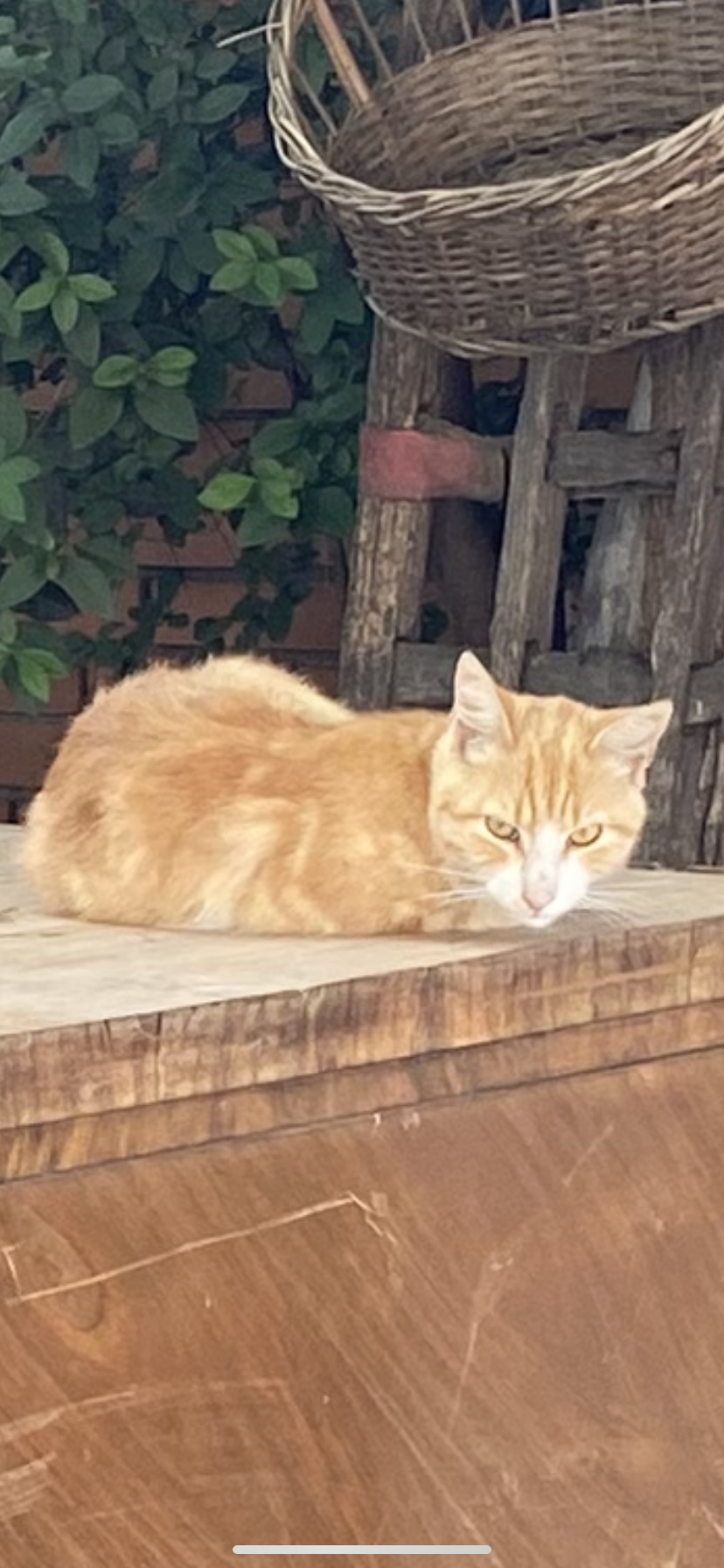
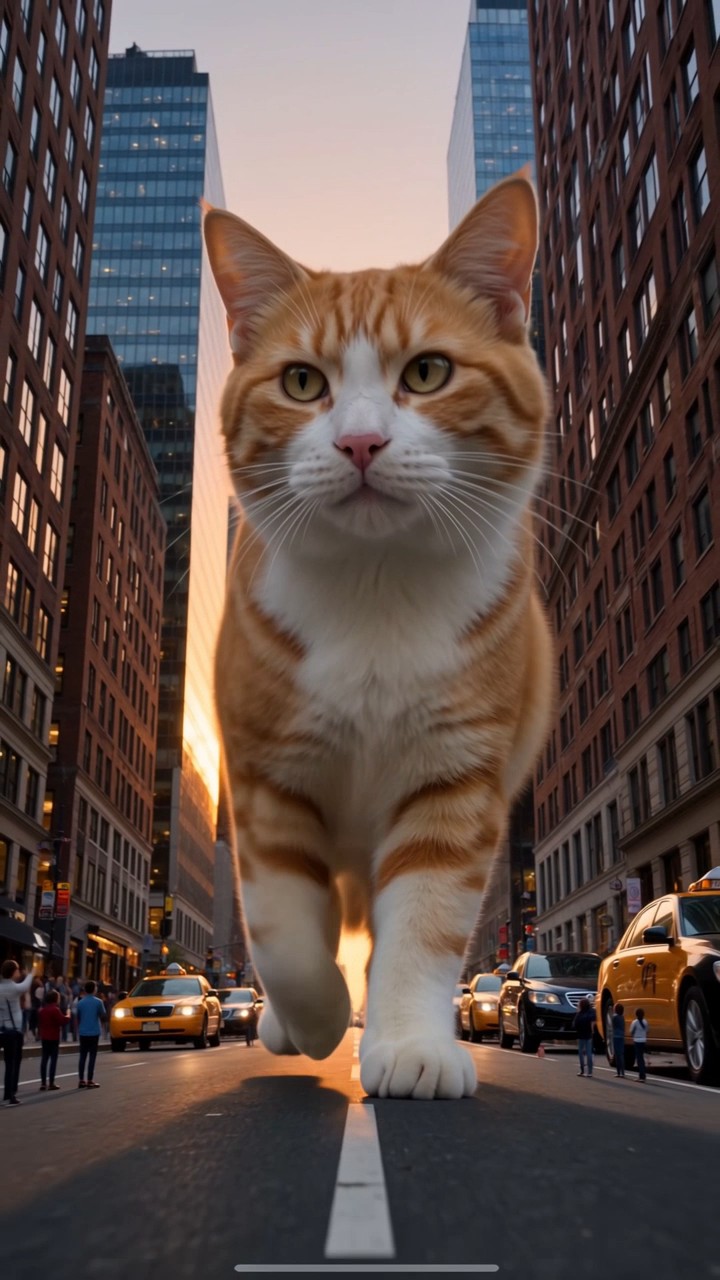
This is the photo we used and a frame from the resulting Kling 4.0 video. In the clip, the cat walks toward the camera between buildings and taxis.
- Use a photo of just one cat, with the face and markings in focus.
- Choose even light and keep hands or furniture from covering the cat.
About the trend
What is Giant Cat AI Video?
Giant Cat AI Video is a short vertical clip where a house cat appears at giant size in a real place, such as a crowded street, and walks past people and cars that look tiny next to it. The surprise of the scale is what makes people stop scrolling.
With Giant Cat AI, one cat photo is enough to make your own version set on a New York street. You don’t need to cut out the cat or write a prompt.
Read the full Giant Cat AI Video trend guideAt a glance
Giant Cat AI specs
- Input
- One clear photo of one cat or pet, JPG, PNG, WebP up to 10 MB
- Available scene
- New York Street
- Video length
- 10 seconds
- Output
- 720p vertical 9:16 MP4
- Video model
- Kling 4.0 Standard, used for the New York sample.
- Price
- 10 credits per video; packs from $9.90 for 10 credits
- Credits
- Never expire, no subscription
- Render time
- Depends on the queue
- Failed renders
- Credits refunded automatically
Features
Everything you need for a Giant Cat AI Video clip
One photo is enough
A sharp photo gives the model a clear reference for your cat’s face and coat. Fine details can still change.
A street that shows the scale
The low camera angle puts the cat next to cars and buildings so you can see how big it is.
Vertical and ready to post
Exports in 9:16 so it drops straight into Reels, Shorts or TikTok.
No prompt to write
The New York street scene already has a prompt. Just bring your cat photo.
Private by default
Uploads are stored privately, used only for your render and deleted automatically 7 days after upload.
Fair billing
Credits never expire. If a render fails, the credits go straight back to your balance.
Ideas
What people make with it
Surprise the group chat
Send a clip of your cat towering over the city before anyone else jumps on the trend.
Try it with your catPet birthdays
Turn your cat’s birthday photo into a giant-size greeting clip for family and friends.
Try it with your catPet account content
Post a fresh trend clip on your pet’s channel without filming or editing.
Try it with your catPricing, credits & downloads
One-time packs for your giant cat videos
Each 10-second video uses 10 credits. Packs start at $9.90. Pay once, with no automatic renewal.
We’re finishing setup with our payment partner, so purchases aren’t open yet. Check back soon.
1 Video Pack
Make one clip from a favorite cat photo.
$9.90
10 credits
Makes 1 × 10s video
- Credits never expire
- New York street video
- Download completed videos as MP4
- Credits return to your balance if a render fails
3 Video Pack
Try three photos or make a few versions of your favorite.
$19.90
30 credits
Makes 3 × 10s videos
- Credits never expire
- New York street video
- Download completed videos as MP4
- Credits return to your balance if a render fails
5 Video Pack
Make a set of clips to pick your favorites.
$29.90
50 credits
Makes 5 × 10s videos
- Credits never expire
- New York street video
- Download completed videos as MP4
- Credits return to your balance if a render fails
Prices in USD. Taxes are calculated at checkout by our payment partner.
Questions, answered
Questions about a photo, a render or a purchase? Contact support with your video ID or order number if you have one.
Contact supportWhat is Giant Cat AI?
Giant Cat AI turns one photo of your cat into a short Giant Cat AI Video set on a New York street.
Recognize the giant cat trendCan I make the New York giant cat clip with my cat?
Yes. Upload one photo of your cat. The sample shows an orange tabby walking toward the camera between buildings and taxis. Your video uses the same street setup, but the exact shots and movement can vary.
Is one photo enough, and which photo works best?
Yes. Upload one JPG, PNG, WebP image up to 10 MB. Choose a well-lit photo with one cat, both eyes and its coat markings visible. The whole body is helpful; a clear shot of the head and chest also works as an input.
See the input photo and the actual resultWill it still look like my cat?
The photo guides the face, fur color and markings, but Kling 4.0 can redraw details. Our New York example kept the orange tabby look and changed the white markings around the face. Try a sharper photo with a clear view of the muzzle and eyes if recognition matters most.
Can I make a video on my phone?
Open the generator in your phone browser and pick a photo from your library. On a computer, you can also scan the upload QR code with your phone.
Do I need to write a prompt?
No. The generator uses a preset prompt for the New York street scene.
Can I make a giant cat video for free?
Watching the sample and previewing your photo are free. To render your own video, you need 10 credits. The smallest pack is $9.90 before any applicable tax.
What do I get, and how do I download it?
The 10-second format is a 720p vertical MP4 (9:16) for TikTok, Reels or Shorts. Once the render succeeds, use Download MP4 in the result or in My videos. There is no separate download charge. Finished videos are kept for 30 days after they finish.
Does the download have a watermark?
We do not add a Giant Cat AI logo to the downloaded MP4. The player identifies it as AI-generated. Preview the clip before posting and label it as AI-generated when you share it.
How long does a render take?
Render time varies with the queue. You can close the page and check My videos later.
How do credits work?
Each video costs 10 credits. You buy a pack once, and the credits never expire. There is no automatic renewal.
What if a render fails?
If a video fails to render, the credits go back to your balance automatically. You can try again with the same photo or a clearer one.
Can I use a photo of someone else’s cat?
Only if you took the photo or have the owner’s permission. Do not upload photos that show people, and do not use images you found online.
What happens to my photos?
Your upload is not posted publicly. It is used for the render and applicable safety checks, and deleted automatically 7 days after upload. You can delete a finished clip in My videos.
Your Giant Cat AI Video moment is one photo away
Upload a photo of your cat and see it tower over a New York street.
Create my video · $9.90+